

In last years a lot of deep learning models went to market to segment object and scenes inside still pictures or even videos. sometimes only with segmentation like yolo8-seg or segment anything SAM/SAM 2 of Meta, and sometimes with ViT transformers like segformers.
Recently Meta launched two new segmentation models:
SAM 3 (GitHub)
First one is SAM3, that is a model developed for the open-vocabulary 2D segmentation that can isolate objects inside images and even videos not with point to click mode like previous version but with a text transformer that can help to isolate the object by textual specifying the keywords “i.e. a penguin”.
This is possible thanks to a transformer vision encoder (ViT) that uses windowed attention like SAM2, and a text encoder, that are both components of a Perception encoder. After the encoder there is a detector model that takes these inputs and masks the corresponding elements in image(s) to create a mask.
SAM 3D (GitHub)
Second one, and the topic of this article, is SAM3D that is indeed a generative model developed for the 3D object reconstruction starting from a single image, predicting geometry, texture and layout (rotation, translation, scale).
Meta released SAM 3D in two flavors: SAM 3D Body, focused on 3D human body reconstruction, and SAM 3D Objects, for generic objects. They share the SAM family branding but are separate models with different architectures; this article focuses on SAM 3D Objects. Both expect two inputs: the original image and a mask of the target object, which can come directly from SAM 3.
These models are trained with the same multi-stage approach used for modern LLMs. It starts with pretraining on 2.7 million synthetic 3D meshes drawn from open 3D libraries (Objaverse-XL), then moves to a mid-training stage in which those synthetic meshes are rendered and pasted into real photos. Only at this point does post-training on actual real-world images begin, and this is where the paper’s main innovation lies.
Building 3D meshes by hand is impractical at scale, so SAM 3D uses a model-in-the-loop data engine: for each photo, a suite of 3D-generation models (including the latest checkpoint of SAM 3D itself) proposes multiple candidate meshes, and human annotators simply pick the best one. As SAM 3D improves, the candidates it produces get better, which speeds up annotation and yields higher-quality training data, in a self-reinforcing loop. Over the project’s lifetime this produced 3.14M annotated shapes, 100K textures, and 7M+ human preference comparisons.
But how this model works compared to other segmentation models? Let’s start from begin, with the two images in input.
Before real model layers are kicking in, there is a preprocessing step made by a DINO v2 model (remember last month article?) that is in charge to extract embeddings from those images as “visual notes”, so lets take a concrete example: for testing purposes I’ve choose an amazing monument of my city: the Arena di Verona, a Roman empire amphitheatre, dated back to first century AD

Center: Masked object using SAM 3
Right: Mask overlay on original image
Here DINO v2 can extract infos like shape (“elliptical/round object”) or colors (“marble/stone pattern”) in form of vectors, that conditions the first model of SAM 3D in order to perform its task.
Geometry model
It’s a 1.2B params flow matching model, a sibling of diffusion models used in image generation, that infers shape and layout of the object, starting from noise and guided by the image, the mask and all the info that comes from dino as vectors, and creating a coarse voxel representation. Voxel is the short form of “volumetric picture element”, that is a sort of pixel representation in a 3D coordinate space (x,y,z).
Geometry model also predict layout of the object, in form of rotation (R), translation (t) and scale (s) in camera coordinates, so the object is rebuilt taking care of his position in the scene.
Optionally, the Geometry model can be conditioned on a coarse scene pointmap, from iPhone LiDAR or from monocular depth estimators like Depth Anything, which improves the accuracy of translation and scale, especially in scenes that are particularly crowded of objects.
Voxel are now processed by a second model that synthesize the 3D model
Texture & Refinement model
600M params sparse latent flow transformer, same flow matching paradigm as the Geometry model, that takes the coarse voxels produced by the Geometry model and does two jobs at once: it refines the geometry, adding finer detail, and synthesizes the object’s texture. Its conditioning is the same DINOv2 vectors from image and mask, plus the active voxels coming from the Geometry model. The output is a structured latent representation (SLAT) that can be decoded into either a textured mesh, the classical 3D format for editing pipelines and game engines, or a 3D Gaussian splat, a cloud of small colored 3D blobs designed for fast, photoreal rendering, via two variational autoencoder (VAE) decoders, one producing meshes and one producing Gaussian splats, that share the same latent space.
Now that we have the SLAT representation in the latent space, we hit the last decoding step.
VAE decoder
The Texture & Refinement model doesn’t produce a 3D file directly, but only a latent representation.
The VAE decoder is what converts SLAT into an actual exportable 3D model. The paper’s architectural contribution here is a modified VAE called Depth-VAE: during training, its encoder aggregates DINOv2 features only from voxels actually visible in each view, instead of from all voxels along the camera ray.
This eliminates feature contamination from occluded geometry, yielding a cleaner latent space and sharper final reconstructions: the decoder finally produces the mesh you can open, edit and export.
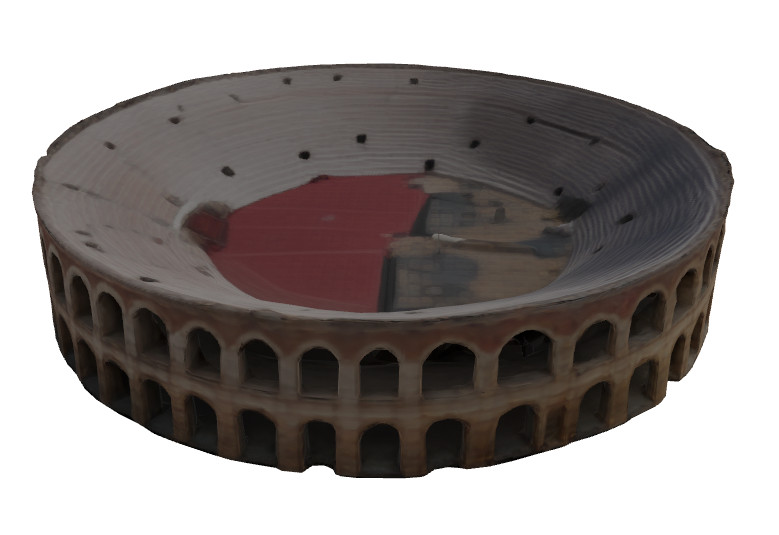
So now what? We have a 3D model, right? Yes, and so it can be… printable!
The image underneath show a timelapse of the 3D print of the model generated, in silver PLA. The print took 4 hours at 60mm/s and finally makes the Arena fits in my hand 🙂

As you can see in the the last frame, the Arena is similar but not the same as the real one.
First of all, my fellow citizens have probably noticed from the first segmentation mask image that the “wing” is missing, that’s a narrow strip of external wall, part of the amphitheatre’s outer ring, which seems to have fallen down after a massive earthquake in 1117 AD. The Arena’s identity is partly tied to that surviving fragment of the collapsed wing: it’s a famously incomplete monument, and that incompleteness is part of how Veronese people recognise it.
That said, the model did get the arches right: the right number, the right shape, and the right arrangement in two stacked rows.
So what does SAM 3D do with a landmark whose specificity is partly defined by its damage? There are actually two things wrong with the reconstruction, and they come from two different sources.
First: the wing isn’t reconstructed. This is the model leaning on its “familiar object” cue: it recognises the structure as a Roman amphitheatre, and its category-level priors override the specific evidence in the photo, It works against any landmark whose identity is tied to what makes it different from the prototype.
Second: the overall shape isn’t elliptical. The real Arena is an ellipse roughly 152m × 123m. SAM 3D produced something closer to a circle, losing the aspect ratio entirely. This is a different kind of error, rooted in the inherent ambiguity of single view 3D: from one photo (without a depth sensor) a circle viewed in perspective and an ellipse viewed straight-on can look visually similar, and the model tends to default to the statistically more common shape (a clean circle) over the less common but historically correct ellipse. More input information like multiple views, a real pointmap, or even a model with a higher-resolution would probably close this gap.
Put together, these two failure modes illustrate a fundamental property of single-image generative 3D reconstruction: the model gives you the most likely instance of an object category, not necessarily the specific object you photographed. It’s worth being aware of when you point a tool like this at a landmark, a cultural artifact, or anything whose identity depends on what makes it different from the average.
Cover image: Midjourney
Text: Me 🙂 (grammar corrections made with Opus 4.7)
Images: Wikimedia commons, 3D model viewer, timelapse made with a Rpi 5 and a global shutter camera.

